
ENABLING THE FUTURE OF DIGITAL COMMERCE
Shifting Traditional Sales Processes to Digital Experiences
Who is Acro Commerce?
We are an agency specializing in ecommerce development solutions for mid-market and enterprise organizations.
We architect and tailor solutions to reduce time-to-market, complexity and costs for businesses looking to go direct-to-market or offer self-serve functionality.
We help B2B, D2C and Manufacturing businesses
- Reduce time-to-market for new digital development
- Integrate new and legacy operational systems
- Create and maintain ideal online experiences
- Decrease technology complexity and cost
- Future-proof with best-in-class platforms
Our expertise lies in consultation, decoupled architecture, custom integrations and infrastructure needs. We continuously support our valued clients with an Agile integration framework that allows increased speed-to-market, resulting in better customer service, improved brand experience, increased customer lifetime value, higher margins, and more market share.
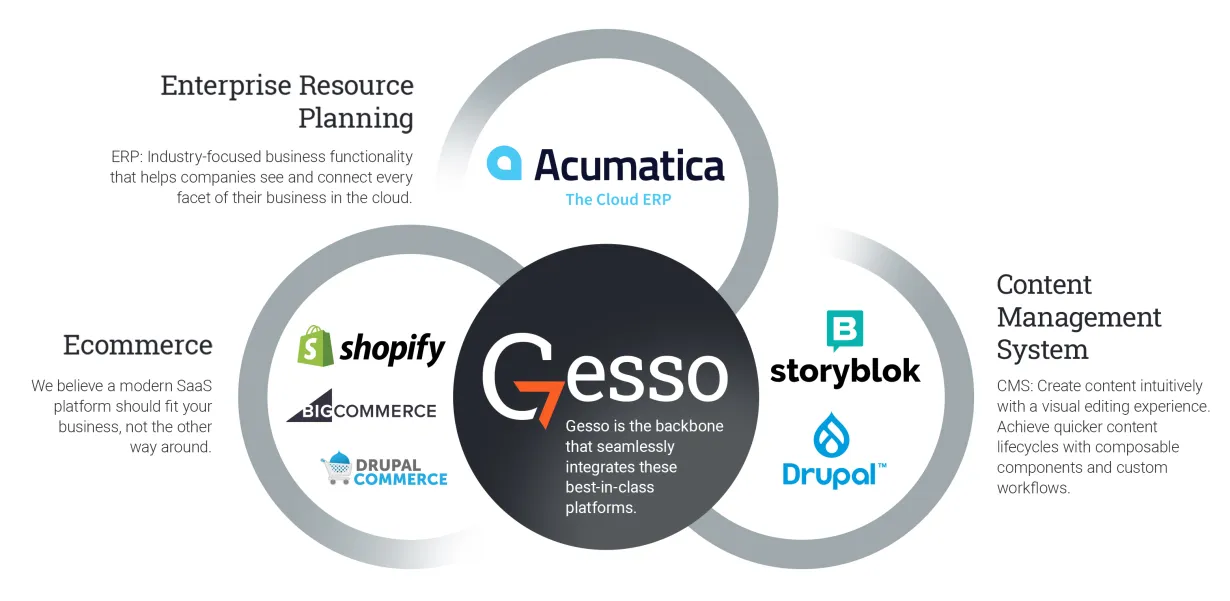
Gesso
Seamlessly integrating ecommerce and content with streamlined sales operations.
- Eliminate limitations that exist with direct platform integrations
- Integrate with any technology platform, including legacy systems
- Build an ideal customer journey for any channel without restrictions
Our Integration Partners
Partnerships between leading platforms make the systems integrations businesses need to become digital leaders and gain market share possible.
Let us introduce you to our strategic partner network.
Case Study: BlueJeans by Verizon
B2B Ecommerce Development

BlueJeans by Verizon is a video-sharing company that allows businesses to host conferences, large-scale meetings and interactive events online. Adding B2B ecommerce for their subscription service made them the ultimate game-changer.
Their architecture required multiple custom integrations and a team that could get them up and running quickly and efficiently. Learn how Acro Commerce made it all happen.
Case Study: ACCURATE INDUSTRIES
Integrating Acumatica ERP & Drupal

Connecting Accurate Industries’ ERP to their ecommerce platform is critical for business improvement and operational efficiency.
Learn how we connected these two vital systems to provide seamless product updates, synchronize customer data and streamline order fulfillment.
Ready to talk?
If you are ready to start your digital transformation, our team is eager to talk and guide you through the process.
Let's get the conversation started today >